Reopen an Outgoing Transmittal
After a BPO is sent, all attribute fields are Read-Only, meaning it can´t be changed. By reopen an Outgoing Transmittal, user will have access to edit recipients, responses and documents. Reopen function is restrictive to users with admin role enabled in the Outgoing Transmittal role section.

To reopen an Outgoing Transmittal:
Navigate to the Outgoing Transmittal´s Detail View, by clicking on “< List” button.
Select the Outgoing Transmittal to be reopened.
Click on “Reopen” button, in the upper right-hand corner.
Modify the required fields.
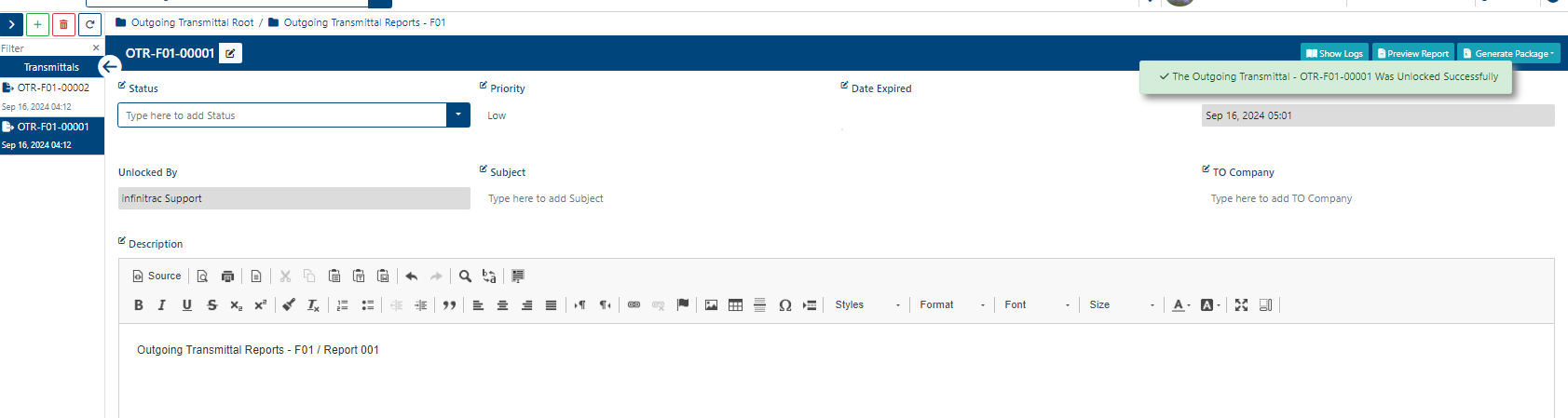
Once the Outgoing Transmittal is reopened, a success alert message will be displayed on the top right hand corner with message: “The Outgoing Transmittal [Filename] Was Unlocked Successfully”.
Only users with “edit” role permission enabled can edit the Outgoing Transmittal.