Advanced Search
This article demonstrates how to perform an advanced search.
Just type [attribute name]:[value][logical operator][attribute name]:[value].
Logical operator - AND, OR, NOT
Value - Term/phrase/word to search for
Attribute names -
Let’s see some examples.
Instructions
To search for files where Name is forecast revision 2 AND where the File_Type is Image OR MSWord, this query is performed:
Name:"forecast revision 2" AND (File_Type:Image OR File_Type:MSWord)To search for files where Name is forecast revision 2, but File_Type is NOT Image, this query is performed:
Name:"forecast revision 2" NOT File_Type:Image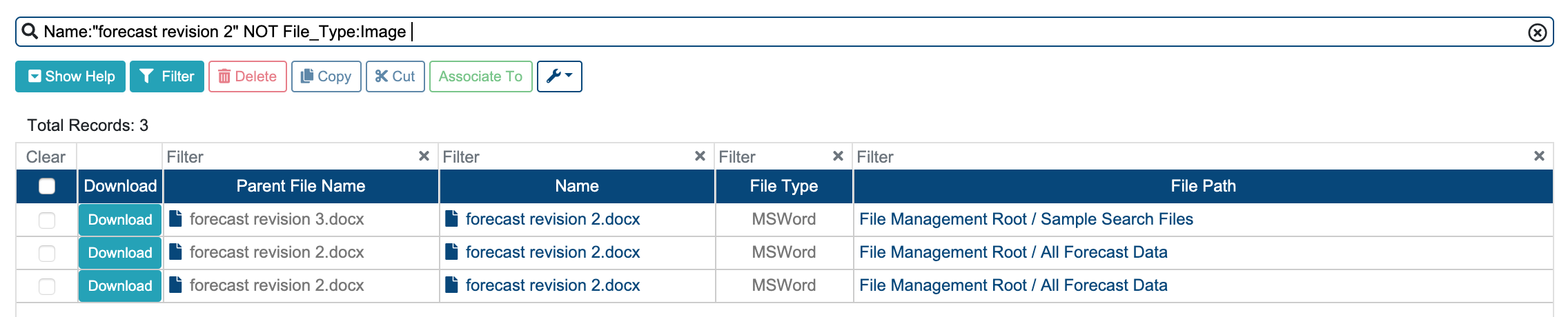
To search for files where Name is forecast revision 2 AND File_Type is Image, this query is performed:
Name:"forecast revision 2" AND File_Type:Image
To search for files by Date_Created between 2020-09-10 and 2020-09-16, this query is performed:
Date_Created:[2020-09-10T23:59:59.999Z TO 2020-09-16T23:59:59.999Z]
To search for files by File Size between 150 and 300 kilobytes, this query is performed:
File_Size:[150 TO 300]
Please note: File Size must be specified in kilobytes.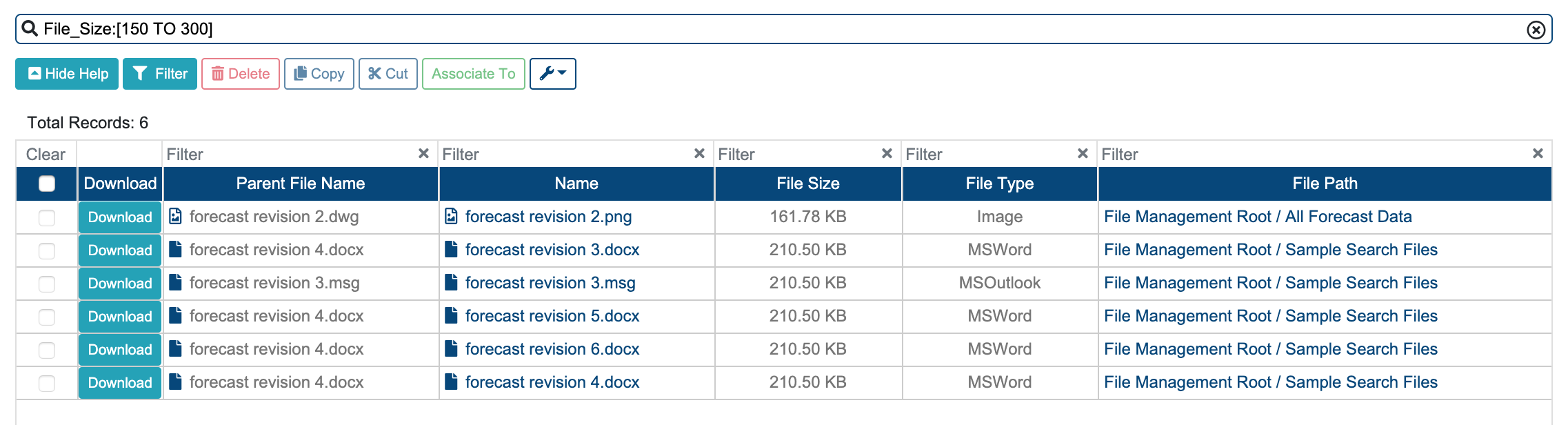
Field Searching
All module items (Eg.: Files, Safety Deficiency Reports) have fields based on all the available columns in their table(s) and are searchable (Eg.: Name:statement).
Fields With Space
To search in a field where the name contains a space (" ") replace it with an underscore (“_”) (Eg.: File_Type:PDF).
Conditional Search Multiple Required
To search for module items (Eg.: Files, Safety Deficiency Reports) with multiple required conditions, join the search terms with AND (Eg.: Name:statement AND File_Type:PDF).
Conditional Search Multiple Optional
To search for module items (Eg.: Files, Safety Deficiency Reports) with multiple optional conditions, join the search terms with OR (Eg.: Name:statement OR Name:blueprint).
Search For Adjoining Sequence Of Characters
To search for an adjoining sequence of characters within a term, add an asterisk (*) to the start and end of the search term (Eg.: Name:*statement*).
Search For Numeric Value In A Range
To search for a numeric value within a range, specify the range with the upper and the lower bounds (Eg.: File_Size:[460 TO 480]).
Keyword Matching
Search for word "foo" in the title field
title:fooSearch for phrase "foo bar" in the title field
title:"foo bar"Search for phrase "foo bar" in the title field AND the phrase "quick fox" in the body field
title:"foo bar" AND body:"quick fox"Search for either the phrase "foo bar" in the title field AND the phrase "quick fox" in the body field, or the word "fox" in the title field
(title: "foo bar" AND body:"quick fox") OR title:foxSearch for word "foo" and not "bar" in the title field
title:foo -title:bar
Wildcard Matching
Single character: ?
Multiple characters: *
Wildcard characters can be applied to single terms, but not search phrases.
Search for any word that matches te?t
body:te?t
(this would match both test, and text)Search for any word that starts with "foo" in the title field
title:foo*Search for any word that starts with "foo" and ends with bar in the title field
title:foo*bar
Lucene does not support using a * symbol as the first character of a search.
Proximity Matching
Lucene supports finding words within a specific distance away.
Search for "foo bar" within 4 words from each other.
"foo bar"~4
Solr DisMax and eDisMax query parsers can add proximity matches to a user query.
Range Searches
Range Queries allow one to match documents whose field(s) values are between the lower and upper bound specified by the Range Query. Range Queries can be inclusive or exclusive of the upper and lower bounds. Sorting is done lexographically.
mod_date:[20020101 TO 20030101]
Boosts
The higher the boost factor, the more relevant the term will be, and therefore the higher the corresponding document scores.
A typical boosting technique is assigning higher boosts to title matches than to body content matches:
(title:foo OR title:bar)^1.5 (body:foo OR body:bar)
Beginning With (^)
The (^) symbol can be used to write ‘beginning with’ type of searches. For example, to get all files that has a word in its name beginning with '2021', the following can be used:
Name:^2021
returns:2021-12-14_14_AF-0008.zip2021-12-14_14_AF-0004.zip2021-08-04 Wednesday.pdfWhatsApp Image 2021-07-04.jpeg
Keep in mind, that this will return any item that has a word in its name beginning with ‘2021’. Not just the items thats name begins with '2021'. This is currently caused by the search server configuration, that splits the file names into multiple smaller segments during indexing.
Related articles
Related issues |
|---|