Uploading a Folder Structure
Instead of simply uploading multiple files into one folder, entire folder structures (with subfolders, files) can also be uploaded. These structures need to be archived/zipped prior to upload, and infinitrac will upload and unpack them into the same folder structure.
To upload a structure:
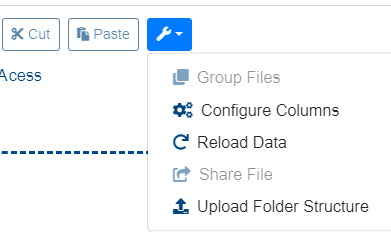
Select the “More Options” menu from the Folder Content View's toolbar.
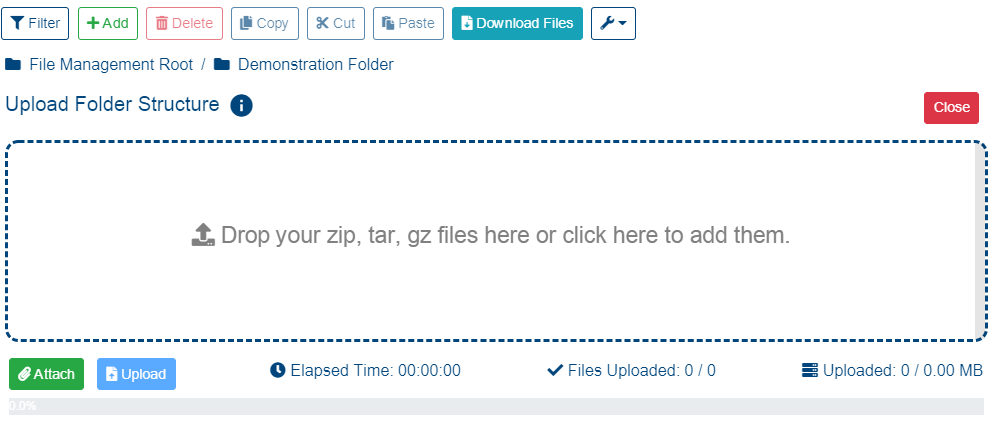
Click on “Upload Folder Structure“ the dropzone changes to reflect that an archive will be uploaded. The accepted extensions (zip, tar, gz) will also be displayed.
Click in the upload area, on the attach button, or drag and drop the archive(s) to upload and unpack.
Click “Upload” button, located below the dropzone.
Uploading large/multitude of files and folders can take time, depending on the internet connection. User will receive an e-mail notification as soon as the upload finishes, including details of the uploaded folder structure's location within the File Management module.
On a success operation, the next message will be shown: “File has been uploaded. You will receive an email notification when upload structure task will be completed“ a failed operation will display the message: “An error occurred: Failed to upload folder structure“