Folder Access
To be able to manage Folder Access User must have the following Roles enabled:

Folder Access is a feature that allows control over how the File Library is viewed by different users. One example is creating roles for each contractor and restricting access to specific folders so that only authorized users can view their contents.
For example, a document controller on-site may upload invoices from contractors and restrict access to that folder to the owner's procurement department.
When access to a folder is restricted, only users with the specified role will be able to view it.
Folder Access applies to all future subfolders created under the currently selected folder; existing subfolders do not inherit access permissions.
When a folder is moved to a different location, its access settings are preserved.
To restrict access to a folder:
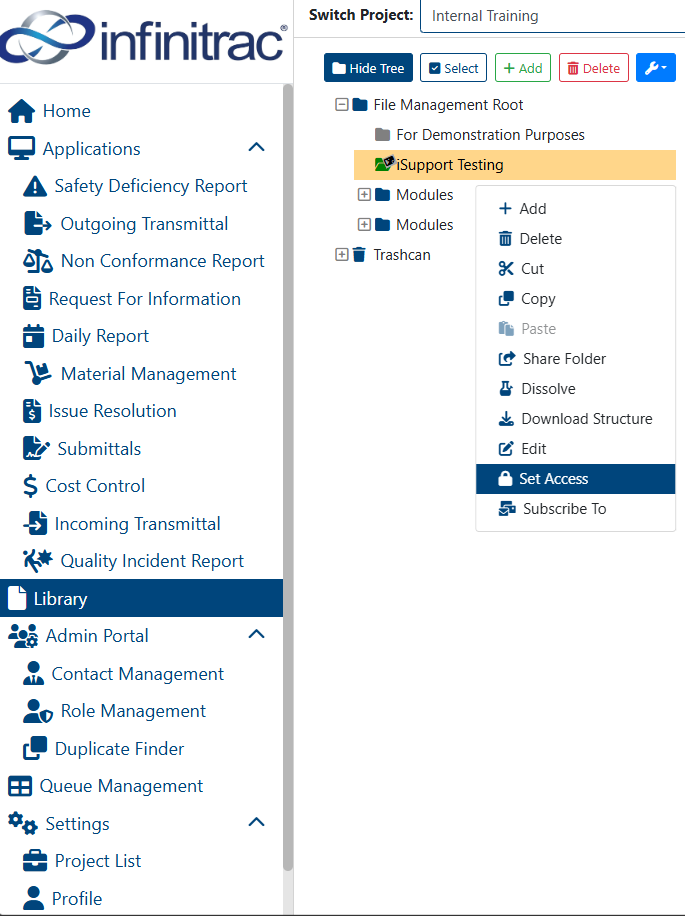
Select the folder to restrict access to, by clicking on it.
Click on “More Options“ button on the toolbar.
Click “Set Access” button from the dropdown menu.
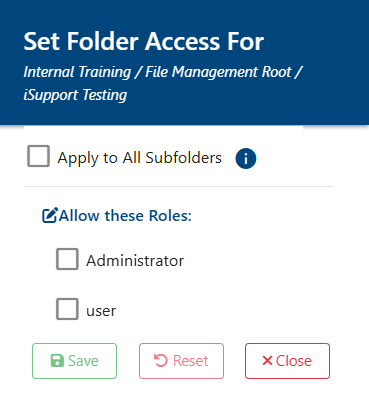
Select the relevant roles for the folder
Click “Close“ button.
A Folder with no Access assigned to it is visible to every user within the project
A successful operation will display the following message: “The folder access has been applied successfully.” A failed operation will display: “An Error Occurred: Fail to set folder access.”