Sticky Notes References
This document guides the user how to add and delete sticky note references.
A Sticky Note can have one or more references to items in the infinitrac Library, such as documents or images.
How to add a reference
To add a reference to a Sticky Note, click the Sticky Note window’s Reference Items tab (Figure 8). Then click the Associate Reference Items icon. infinitrac opens a window showing the contents of the infinitrac Library. You can use this window to choose the items that you want the Sticky Note to reference.
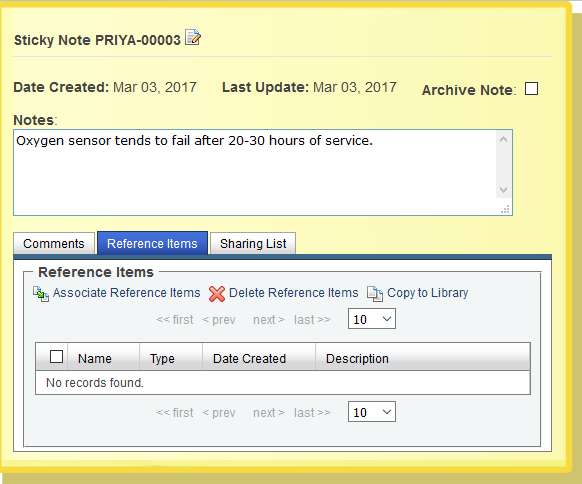
Figure 1. The Sticky Note window's Reference Items tab
How to delete references
To delete one or more reference items from a Sticky Note, click the Sticky Note window’s Reference Items tab. Check the checkbox next to each item that you want to delete, then click the Delete Reference Items icon.
WARNING! Once you delete a reference item, you can’t undo the action.
Copying a referenced object into the Library
You can also copy referenced items into the Library. This is useful when another user has shared a Sticky Note with you; you can get access to that Sticky Note’s referenced objects as well your own.
To copy a reference item into the Library, navigate to the Library folder in which you want to store the object, then click the Reference Items tab’s Copy to Library icon.