Edit Folder
Editing a folder in infinitrac.
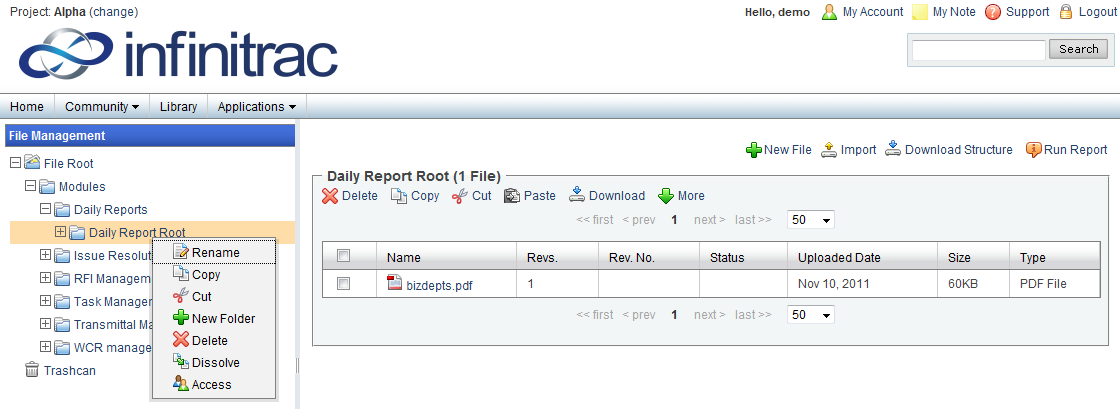
Figure 1. Folder Editing Options Displayed
To rename, copy, cut, paste, dissolve, add or delete a folder, right click the selected folder and choose the appropriate option.
To add a new folder, click the "New Folder" link which will open up a new window.
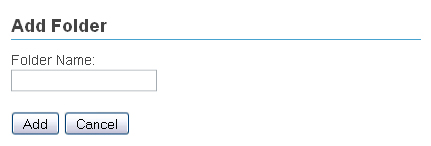
Figure 2. Add Folder
Add a Folder Name and specify if the folder is a "Mount Folder".
If the folder is specified to be a "Mount Folder" you will be able to set the folder's Prefix.
To set an Un-Mounted folder as Mounted, right click the folder to view the editing options, then click the "Set As Mount" link. A success message should appear if the folder has been Mounted successfully.
When a new folder is made, it will become a sub-folder of the folder selected.
Click the "Dissolve" link to dissolve a folder. Dissolving a folder will delete the selected folder and move its content into its parent folder.
If a dissolved folder has sub-folders, those sub-folders will not be deleted and will still remain under parent folder.