Sticky Notes Comments
This document guides the user how to add and delete sticky note comments.
A Sticky Note can have one or more comments: additional notations made at some time after the Sticky Note itself was created. Comments can be added by the author of the Sticky Note, or by any other infinitrac user whom the Sticky Note’s author has shared it with (see section, How to add a contact ).
How to add a comment
To add a comment to a Sticky Note, click the Sticky Note window’s Comments tab, then click the New Comment icon in the tab’s upper left corner. Infinitrac opens a Comment window:
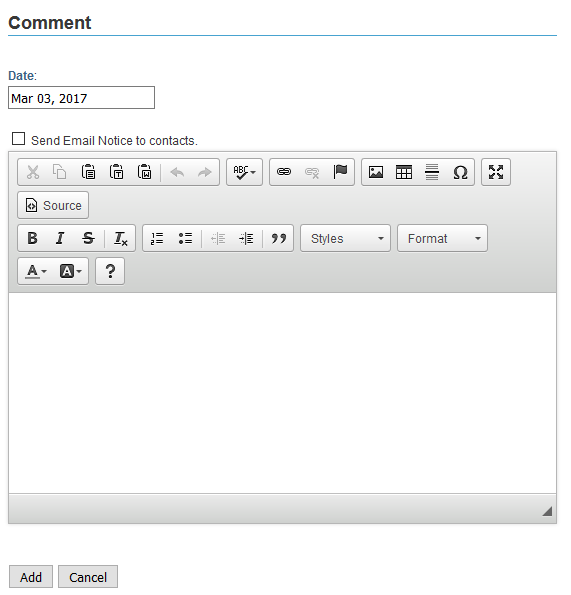
Figure 1. The Comment window
Enter the comment in the edit box and click the Add button.
When you add a comment its Date and Author attributes are automatically set, and are shown in the detail view.
How to delete comments
To delete one or more comments, click the Sticky Note window’s Comments tab (Figure 2). Then click the checkbox next to each comment you want to delete and click the Delete Comment icon.
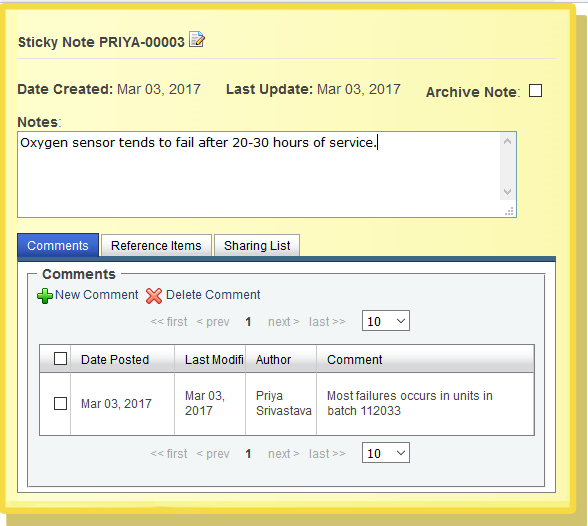
Figure 2. The Comment tab, with a comment
WARNING! Once you delete a comment, you can’t undo the action.