3.10 Generate a Report
Generating a report creates a Report in .xlsx format with all the files with their respective metadata and file path
To generate a report:
- The desired directory must be selected in the folder browser
- Select the type of report to be generated from the drop-down list (Figure 2.)
- Selecting All Revisions will generate a Report that includes all file revisions
- Selecting Latest Revisions will generate a Report that includes only the latest revision of each file

Figure 1. Run Report button
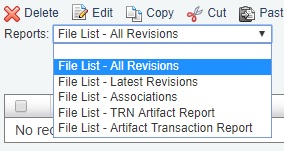
Figure 2. Report type drop-down list