4. Search bar
The Search bar is always available at the header of the page (Figure 1.) performing a basic search will include all of the document content and attributes and all files within the File Management, the results will allow users to navigate to the desired file's parent folder, download the file or view a thumbnail of the file (if it's an image or PDF)
Search types:
In the following several different types of searches will be explained:
| Search type | Example | Search results |
|---|---|---|
| Standard search | site safety plan | This will search for each word individually, the results will include any of the searched words |
| Using quotes | "site safety plan" | Will search for a specific phrase |
| AND operator | "site safety plan" AND fire | Search results will include the phrase specified in quotes AND the specified word |
| OR operator | "site safety plan" OR fire | Search results will include the specified phrase, OR the specified word |
| NOT operator | "site safety plan" NOT fire | Search results will include the specified phrase, but NOT the specified word |
| Single character wildcard "?" | te?t | Results in this case will include text or test (single term search only) |
| Multiple character wildcard "*" | test* | Results will include: "test" "tester" "testing" "tests" etc. |
| combination of "*" and "?" | *wr?t* | Results will include: "write", "wrote", "written", "rewrite", "rewrote" etc. |
| Specific Attributes | title: “site safety plan" | documents with the title attribute of “site safety plan" |
Search Results:
Search Result dialog (Figure 2.) opens after entering a search query, in it we find the following information arranged in columns:
- File Type: Image, PDF, Excel file etc.
- Location: File path in the library
- Uploaded By: Name of uploader
- Date Modified: Date of files last modification
- Thumbnail (if the resulting file is an image or a PDF)
Clicking on the green arrow in the Location column will redirect us to the files parent folder, and open the Detailed View for that file, clicking the Thumbnail will download the file

Figure 1. Search bar
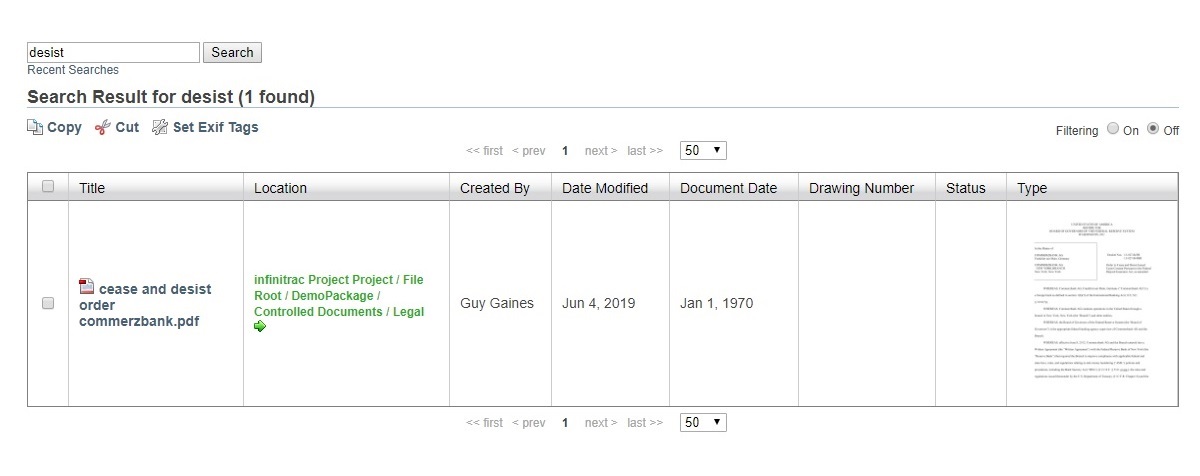
Figure 2. Search results