Conducting a meeting
Here are the general ways in which a Meeting Minute will be documented while a Meeting is conducted. Some Meetings will differ in structure, but this general outline will provide you all the know-how to properly document a meeting in whatever order it is conducted.
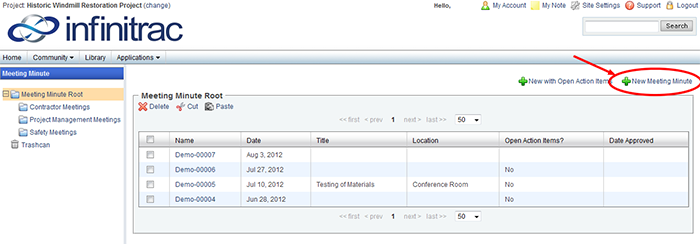
Figure 1. In Creating a New Meeting Minute.
When you know the expected Attendees or when they join the meeting, add them to the minute in the "Attendees" section by selecting the " Add Attendee" button.
A window will now open displaying your Contact Manager. Add new contacts using the " Add Contact" button. When the contact manager has all persons in attendance, check the box to the left of anyone in attendance and click " Add to Meeting Minute".
Find the "Meeting Minute Line Items" section. If the Agenda Line Items are to be Meeting Line Items, click " Autofill with Agenda Items".
When the meeting is ready to begin, click the "Start Meeting" button in the upper left of the meeting minutes page.
When the meeting has begun, scroll to the "Meeting Minute Line Items" section for note taking.
For any details on the topics of discussion, click " Add Line Item. A new blank Line Item will appear in the table.
Choose a Subject from the Drop-Down menu under the column heading "Subject". If the Subject is not listed, select "Add Option" from the Drop-Down, a window will open, enter a new option and click "Add".
Click in the blank area below the "Description" column heading. Here you will take notes regarding the topic of discussion.
You will repeat adding Line Items, outlined in the previous step, throughout the meeting as your note taking tool.
Some Line Items will define actions that are required to be carried out. If a Line Item will have associated actions, click the check box to the right of a Line Item under the column heading "Action Item". A new window will open displaying the Action Item(s).
Figure 4.1 - Meeting Minutes Action Items View
The Action Item window will now open displaying the Title and Description based on the Meeting Minute Line Item. If the Action Item needs more description than in the Line Item, edit the Description from this screen, establish priority, and define your Target Completion Date.
Next, you will assign responsible parties by clicking on the link in the "Assigned To" column. This will take you to an assignments window.
Figure 4.2 - Meeting Minute Action Items Assignments View
You can add responsible parties by clicking the "New Assignment" button in the upper left corner of the "Assignments" table at the bottom of the page.Click "Back" from the Action Items window. DO NOT click your Browser's Back button.
This will open your Contacts window where you can select different contacts by the checkboxes on the left, then click "Add to Meeting Minute" link in the upper left corner.
You will then be returned to the Assignments window, where you can fill out Project and Department data for any responsible parties.
You will now be viewing the Action Items List window. From here, you can close the window to return to the Meeting Minute window, or you can add more Action Items to the same Meeting Minute Line Item.
If adding more Action Items, click the " Add Action Item" button. A new Action Item will appear in the table, you can then define the action the same as outlined above.
Meetings will often have some level of document review. You can store electronic copies of associated documentation to a meeting minute. In the Meeting Minute window, scroll down to the section "Attachments". There are three methods of attaching documents: When the Meeting is complete, click the "End Meeting" button in the upper left of the Meeting Minute window. This will complete the Meeting and display the Start and End Time, and Duration will be automatically calculated and displayed.
" Add File". Used for a single file upload from your hard drive. A blank field and a "Browse" button will appear below the section title "Attachments". Click on "Browse". A window will open displaying your computer, browse to the desired file, select, and click "Open". The File will be added.
" Import". Used for a bulk import of many files from your hard drive. A Java Applet will open in a new window and display a folder tree on the left of your hard drive and attached storage devices and an empty pane on the right. Parse your hard drive for the needed attachments; grab them from the Folder Tree, drag, and drop into the empty pane. When all desired files have been added to the queue, click the green arrow button. NOTE: BIG GREEN ARROW. For more information on using the Java Bulk Uploading Applet see Uploading Files.
" Associate Files". Used for making file associations from the Meeting Minute to other documents in your infinitrac Document Library. A new window will open displaying your infinitrac File Manager. Parse your system for the needed documents; check the boxes to the left of any documents requiring association and click " Add to Meeting Minute". The files will be added, but the window will stay open in case there are files in other folders requiring association.
Figure 4.3 - View and Comment on Meeting Minute Action Items
“Action Items” created in Module “Meeting Minutes”, will appear in Module, “Tasks”. With the same Title and Description assigned in “Action Items”
To access your “Action Items”, in a manner that you could comment on it, preform the following:
Navigate to “Applications” under the Infinitrac logo on the top right corner of your screen and select the “Tasks” Module, Make Sure “Status:” selection is set to “Open”, and the “Assigned to:” selection is set to “All”, to view all Tasks.
The “Action Items” from the “Meeting Minute" Modules will appear here, in the form of a “Task”
Comments edited thru the “Task” Module do not appear in the “Meeting Minute” Module.
Editing a comment thru the “Meeting Minutes Action Items” do not reflect on the “Task” comment.