Request for information Guide
This document guides the user through the infinitrac Request for Information view, identifying its features.
After entering infinitrac, select Applications-> RFIs and then navigate to the appropriate folder below "RFI Management." - Viewable access may vary.
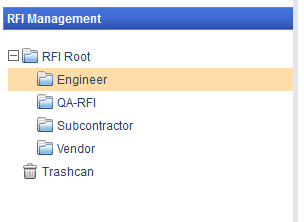
Once you have selected a RFI, right-click the folder to view folder editing options.
Before any RFI can be added to the selected folder, it must have a Prefix set.
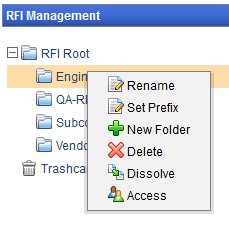
To set a Prefix, right click on a folder to view the Folder menu then click the "Set Prefix" link.
A new window will open allowing the user to set the Prefix to the folder. Click the "Submit" button to apply the Prefix and close the window.
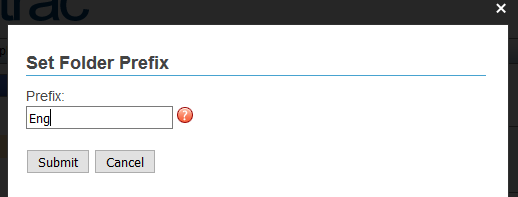
Prefixes can only be set when a Folder is "Mounted." See Edit Folder.
Dissolving a folder will delete the selected folder and move its content into its parent folder.
If the dissolved folder has sub-folders, those sub-folders will not be deleted and will still remain under parent folder.
Clicking the "New RFI" button at the top of this screen will add a new RFI to the selected folder. Also see Add New RFI. RFIs may be organized into subfolders, but will maintain their serialized identification.
RFIs will be named after their Folder Prefix and a serialized number.
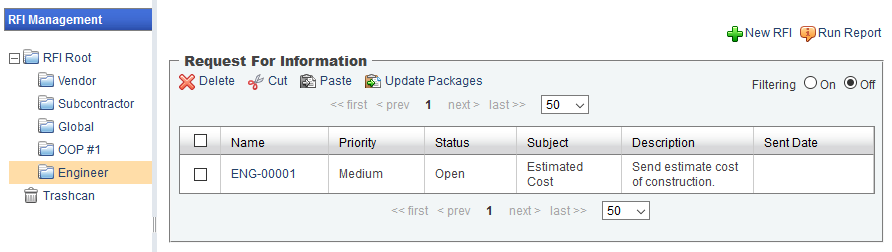
Note: View controls may vary based on instance customization.
When adding a RFI folder, that folder may be designated as a "Mount Folder."
Setting a folder as a "Mount Folder" will require a new "Prefix" to be set, and will also restart the serialized numbering sequence. - Permission may be required
RFI Status and Detail Reporting
This section documents the new functionality available in the RFI module: users can now view all RFIs and generate status and detail reports from the Root level of the RFI structure. This enhancement provides a broader view of project-wide RFIs and simplifies reporting workflows.
Important: RFIs stored in subfolders of subfolders will not be included in this view
Running Excel Reports from the Root Level
Users can now export RFIs to Excel directly from the Root level. The report will include:
RFIs from all immediate subfolders
RFI reports