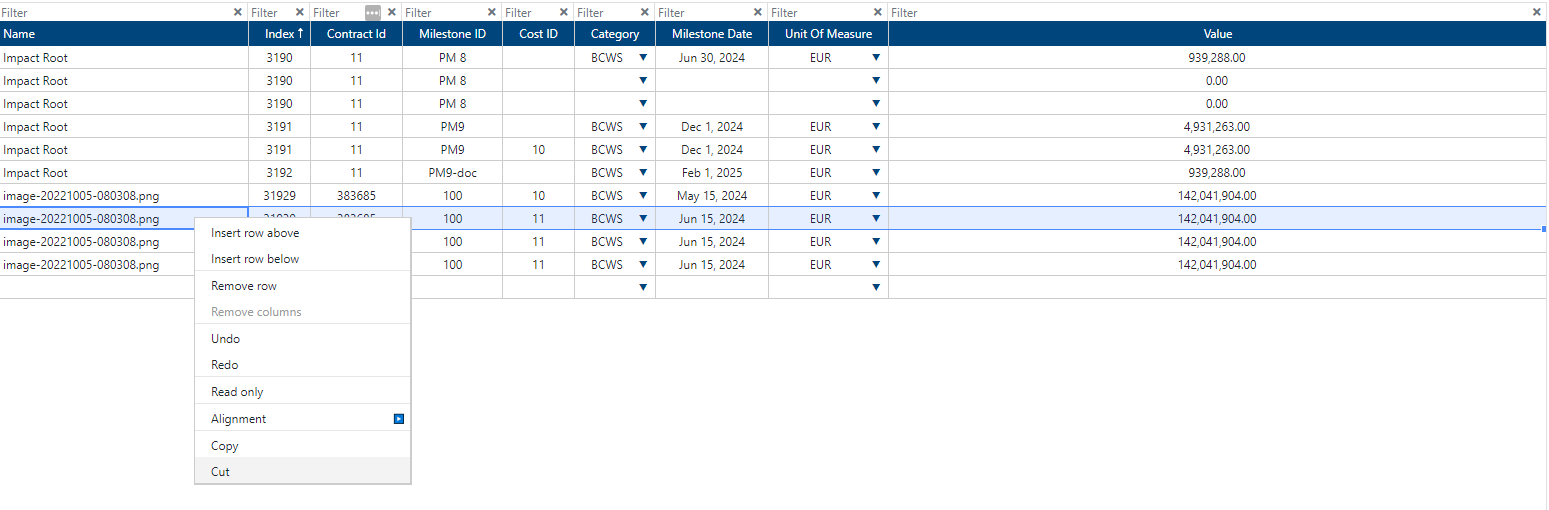
Cut/Paste Cost Control(s)
Depending on the user’s permissions, a Cost Control Transaction can be moved across the Cost Control table via the cut function. In order to use the cut function the user must have the “edit“ permission enabled.

To cut one or more Cost Control Transaction(s):
Select the Cost Control Transaction(s) to be moved by holding down SHIFT and then clicking on the transaction.
Right click on the Cost Control Transaction and click on “Cut“ option.
Right click on section in table where Cost Control Transaction will be moved to and press Ctrl and V(Windows) or ⌘ and V(Macintosh), selected transactions will be moved.
Click on “Save“ button.
Items cut successfully will display the message: “[Number]/[Number] of Transactions updated“.
“Cut” button is disabled until one or more Cost Control Transactions are selected.