Submittal Report file pdf reports into library
This feature is designed to automatically store a PDF copy of the Submittal in a designated library folder whenever the report is sent.
To file pdf report into library, the user’s role must have view, edit folder and admin privileges enabled.

To file pdf report into library:
Select the Submittal application.
Create a new Submittal folder or select an existing DR folder.
Right-click and select the Edit option.
Select Save PDF Report into, then click the Choose Folder option.
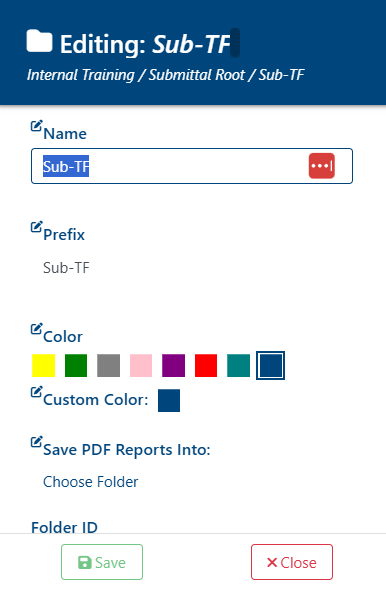
Select the designated folder to generate the reports, then click the Save button.
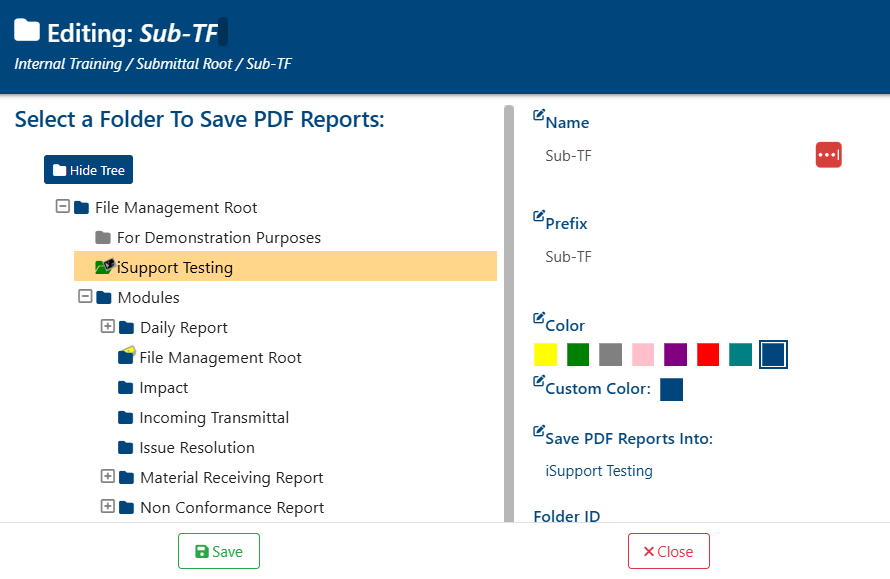
Once the folder is selected, a success alert will appear in the top-right corner with the message:
“Folder updated successfully!”
Generated PDF reports will now be stored in the BPO Modules folder as a reference file whenever a report package is generated or sent out.
If the report is reopened, regenerated, or resent, a new revision will be added to the original report file