Transmittals Guide
The Transmittal module allows the user to send files from File Management of their Local Machine to any recipients in the Contacts module. - Viewable access may vary.
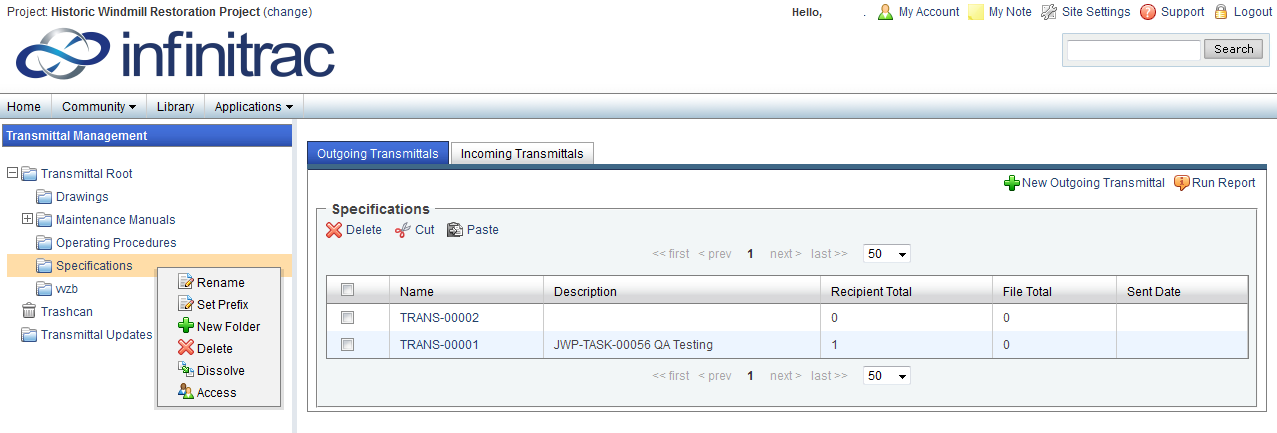
Figure 1- Transmittal Management
Once you have selected a Transmittal folder, right click the folder to view editing options.
You may create, delete, rename, and set prefix to folders.
Before any Transmittal can be added to the selected folder, it must have a Prefix set.
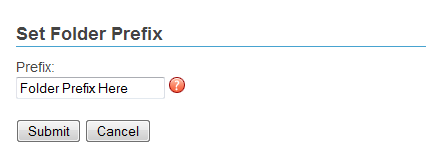
Figure 2 - Set Folder Prefix
To set a Prefix, right click on a folder to view the Folder menu then click the "Set Prefix" link.
A new window will open allowing the user to set the Prefix to the folder. Click the "Submit" button to apply the Prefix and close the window.
Dissolving a folder will delete the selected folder and move its content into its parent folder. (Figure1)The Transmittals are filtered for each folder by the Outgoing Transmittal and Incoming Transmittals tabs on the top of the list view.
If the dissolved folder has sub-folders, those sub-folders will not be deleted and will still remain under parent folder.
Clicking the New Outgoing Transmittal or New Incoming Transmittal links at the top right of each list view will add a new Transmittal to the selected folder.
Transmittals will be named after their Prefix and a serialized number. They may also be organized into subfolders, but will maintain their serialized identification.