Delete Daily Report(s)
To temporarily delete a Daily Report(s), the user role must have the “delete“ privilege privilege enabled.
The infinitrac platform will move the selected DR(s) to the Trashcan, which is visible within the folder tree. These items are not removed from the system.
To permanently delete DR(s), the user role must have the “trashcan” privilege enabled.

To temporary delete an DR in List View:
Select the DR(s) to delete, by clicking on the checkbox next to DR’s Name.
Click “Delete” button in the data table action menu.
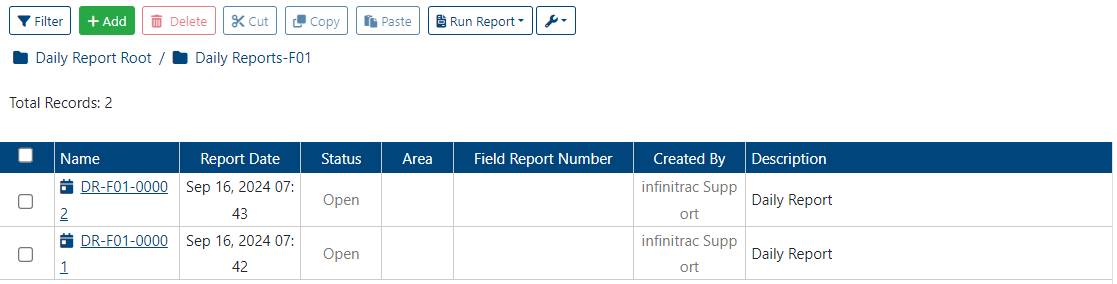
The “Delete” button remains disabled until one or more DR(s) are selected.
Once the DR(s) are deleted, a success alert message will appear in the top-right corner:
“DR(s) successfully moved to Trashcan”
After being moved to the Trashcan, DR(s) can either be permanently deleted or recovered to their original folder location.
DR(s) can also be deleted or restored by removing their respective DR folder(s).
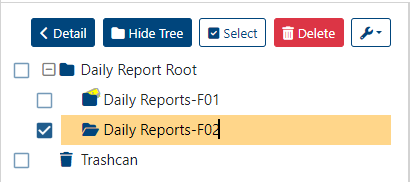
To delete a DR(s) folder(s):
Select the folder(s) to be deleted, by clicking on the checkbox next to folder’s name.
Click on “Delete” button.
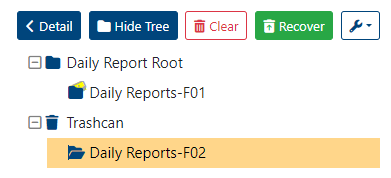
To recover a deleted folder(s):
Select the Trashcan located at the bottom of the folder tree on the left-hand side.
Select the folder(s) you wish to recover.
Click the “Recover” button.
Permanently Delete Daily Report(s)
To permanently delete DR(s) from the Trashcan:
Select the DR(s) you wish to permanently remove.
Click the “Clear” button.
Clearing DR(s) from the Trashcan will also permanently delete all uploaded files associated with those Submittal(s) from the system. This action cannot be undone.
Once the Trashcan is cleared, a success alert message will appear in the top-right corner:
“Item(s) deleted.”
If the operation fails, an error message will be displayed:
“Error Occurred: Failed to clear Trashcan item(s).”
Recover Trashcan Items
To recover one or more DR(s):
Select the Trashcan located at the bottom of the folder tree on the left-hand side.
Select the DR(s) you wish to recover.
Click the “Recover” button.
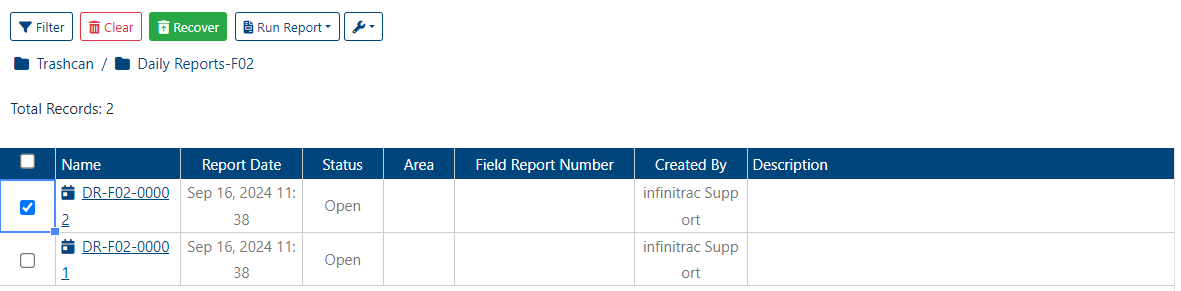
The “Recover” button remains disabled until at least one DR is selected.
The selected DR(s) will be restored to their original folder.
If successful, a confirmation message will appear in the top-right corner:
“Item(s) restored.”
If the operation fails, an error message will be displayed:
“Error Occurred: Failed to restore items from Trashcan.”